Covid 19 ie. Coronavirus cases are increasing day by day across the country. As per the health expert reports this is the 2nd wave of Covid19. To control the spread of Coronavirus, Government is taking some important decisions like No Gathering, Social Distancing, Lockdown etc. Apart from this they are make that everyone will be get Vaccinated as soon as possible.
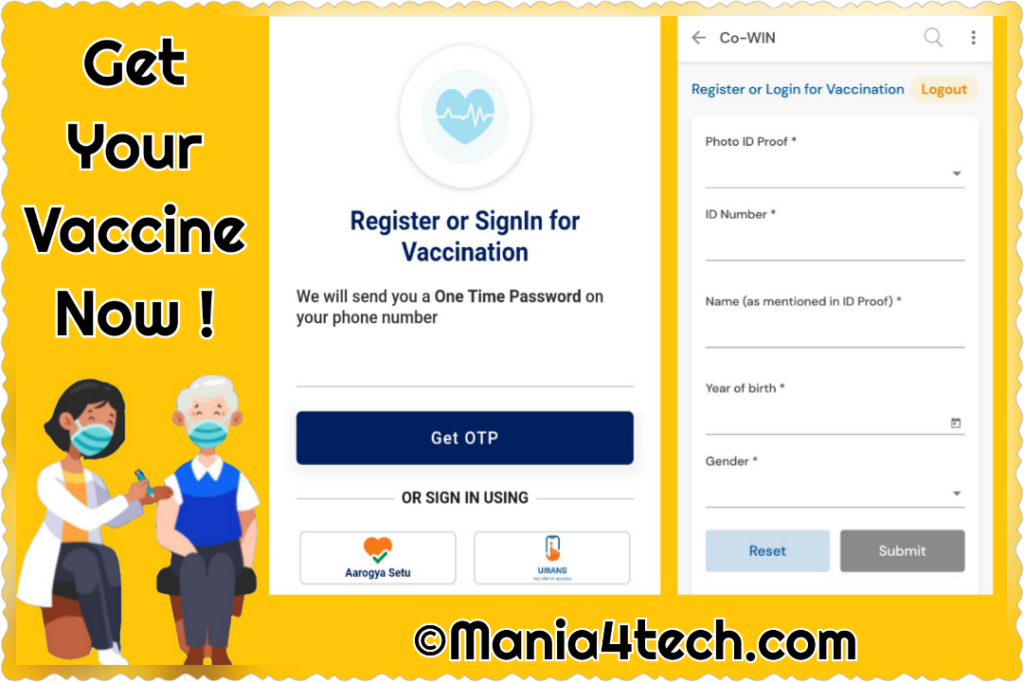
initially Government had decided to Vaccinate Senior Citizens Above 45+ Age group. Due to the highly infection found in Younger generation this days. May 1, people above 18 years of age can also be given the Corona vaccine. All eligible Indian citizens can register on the government’s Co-WIN portal, cowin.gov.in, UMANG App or Aarogya Setu App to get Coronavirus Vaccine.
Vaccination has included government health centers as well as private hospitals. That is, you will have the option to get vaccinated at the center of your choice. How to register for covid vaccine? Tell you the answer to every question about it
There are three methods of registration. You can get self-registration done in advance. Apart from this, there is also an option to register on the spot. In the third option, the government itself will contact you for the vaccine. Let us tell you in detail about all the three methods.
Today we are going to tell you how you can register for free by going to cowin.gov.in.
Anyone over the age of 18 can register themselves by visiting the Co-Win portal. For this, you do not need to give too much time, nor do you need to fill a long form, but you can register yourself by filling some important information. Keep in mind that no amount is charged during registration that means it’s absolutely free registration.
There has been some change in the rules to get Corona vaccinated from 8th May 2022. The new feature of four-digit OTP has been added on the Kovin portal from 8 May ie today. Verification will be done through this code only after that the corona vaccine will be applied. A four-digit security code will come on mobile on online registration.
After online registration, if someone goes for vaccination, he will be asked a four-digit code. The vaccine will be given only after the code is verified.
The matter came before the Ministry of Health that after registration on the Kovin portal, some people could not reach the center due to any reason. They did not get the vaccine, but they got information about the vaccine through SMS.
A four-digit security code is being introduced on May 8, i.e. from today, to remove such flaws. The new feature will be applicable only to those who have registered online to get vaccinated.
What documents are required for vaccine?
You get registered in any mode, you have to show the identity card before vaccination. The government has approved 12 types of identity cards for vaccination. These are:
- Aadhar Card
- Voter ID / Election Voter ID
- Passport
- Driving license
- PAN card
- Health insurance Smart Card
- Pension document
- Bank / post office passbook
- MNREGA Job Card
- MP / MLA / MLC ID Card
- Service ID Card of Government Employees
- Smart Card issued under National Population Register
How to Register through Co-WIN Portal
1. Visit the CoWIN website and click on Register/Sign in yourself.
2. Add your mobile number and click on Get OTP. After receiving the OTP, type the digits on the site, and click on ‘Verify’.
3. Enter all your details, including photo ID proof, name, gender, and year of birth on the ‘Register for Vaccination’ page. Once this is done, hit Register.
4. After you register, you will get the option to schedule an appointment. Click on ‘Schedule’ next to the name of the person registered.
5. Add your pin code and click on Search. The centres in the added pin code will appear.
6. Select the date and time and click on ‘Confirm’.
How to Register through the Umang Or Aarogya Setu App
1. Open the Aarogya Setu app and click on the CoWIN tab present on the home screen.
2. Select ‘Vaccination Registration’ and then enter your phone number. You will receive an OTP and then you can proceed to verify yourself.
3. On the ‘Register for Vaccination’ page, enter all details, including photo ID proof, name, gender, and year of birth. Click on ‘Register’.
4. After you register, you will get the option to schedule an appointment. Click on Schedule next to the name of the person registered.
5. Add your pin code and click on Search. The centres in the added pin code will appear.
6. Select the date and time and click on ‘Confirm’.
Update:
Registration related issues
A number of users are facing issues while registering for the vaccine via the CoWIN portal. This includes some users who have not received their OTPs (One Time Passwords) to complete their registration. Meanwhile, a large number of users who did get their OTPs could not find slots in their areas for setting up a vaccination appointment.
Remember This While Getting Vaccinated
- Register & Schedule your vaccination in advance.
- Register Yourself With Only One Phone Number & One ID Proof.
- Register yourself online for Vaccination through Co-Win Website, Aarogya Setu App Or UMANG App.
- Search The Nearest Vaccine Center Location With The Help Of Pin Code Or Entering Your City Village Name On Portal.
- Don’t Forget To Carry Your Registered ID Proof When You Go For Vaccination
- Don’t Leave Vaccine Center For 30 Minutes After Taking Vaccine.
- Reach Vaccine Center On The Specific Date & Time You Got Through sMs.
- Always Wear A Mask. Follow Social Distancing & Other Protocols Of Covid19.
- Inform The Health Advisor At Vaccine Center If You Are Experiencing Side Effects Within 30 Minutes.
- Don’t Take Alcohol Or Intoxicants On The Day Of Vaccination.
- Don’t Register Yourself Again For The 2nd Dose. Just Login With Your Mobile Number.
- Don’t Walk-in To Vaccine Center Without Getting Online Appointment.
- Don’t Register One Person Again With Multiple IDS or On Multiple Platforms. That Means If You Have Registered On Co-Win Website Then You Don’t Need To Register On Aarogya Setu & UMANG For The Same. Just Use One Option Among Them.
- Don’t Be Panic If You Found Any Sode Effects After Leaving Vaccine Center. You Can Also Inform To Helpline Number +91-11-23978046 (Toll-Free 1075) In Case Of Side Effects.